MAJOR UPDATE
The New goHeather: In-app editor, surgical AI edits, edit from chat, and adjustable analysis levels.
Try For Free Now


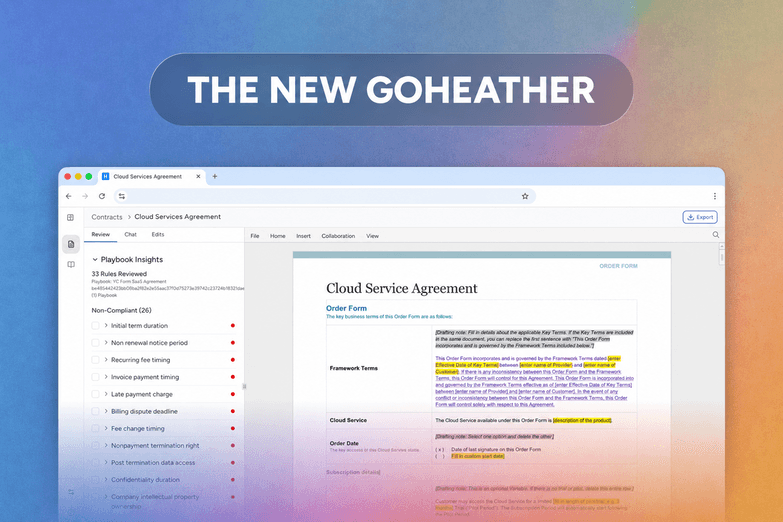

If you've used goHeather over the last year, you know we've been head-down on something big. Today's the day. V2, the new goHeather is live today, and it's by far the biggest upgrade we've ever shipped.
Here's the short version. V2 takes contract review from a wall of red text and a temperamental Word add-in to a guided, step-by-step workflow inside a real editor in the goHeather application, in your browser. The AI doesn't just find issues anymore; it walks you through them one at a time and fixes them in place seemlessly. Contracts that used to take an afternoon take a coffee.
This blogpost is about how we got there and the four features doing most of the work.
The biggest single change in V2 is that you no longer review contracts through a Word add-in. We know the V1 add-in was the most frustrating part of the product. The bugs, the version mismatches, the inconsistent behavior between Word for Mac and Word for Windows, the "is this me or is this goHeather?" troubleshooting every time something didn't work. We tried to keep up with it, but we couldn't ship fixes faster than new bugs appeared.
There's another, quieter problem V1 had that the add-in masked. V1 reviews weren't really documents at all. They were long-form HTML reports that listed the AI's findings, explained the issue, and showed a "Suggested Change" block of text, and then left you to manually copy that text back into your own Word file. The product told you what to do, and you still had to do it.
V2 ships with a full Office-style document editor built directly into goHeather. Open a contract and it loads in a familiar, ribbon-driven editor in your browser, with File, Home, Insert, Collaboration, and View tabs across the top, the full formatting toolbar underneath, and tables and highlighted fill-ins rendered correctly the first time. Track changes, formatting, comments, navigation, all the muscle memory you have from Word works here. The difference is that the editor is part of goHeather now, not a plugin glued onto someone else's product. We own the entire surface. When something breaks, we see it within minutes and fix it the same day.
For everyone who lived inside the Word add-in, the move is friction-free. Log into V2, upload a contract, and you're in the editor. Everything you used the plugin for happens in the same place, except now the AI review, Chat, suggestions, and playbook insights all live alongside the document in the same window. No flipping between Word and a browser tab, no "let me re-open the add-in." One screen, one tool.
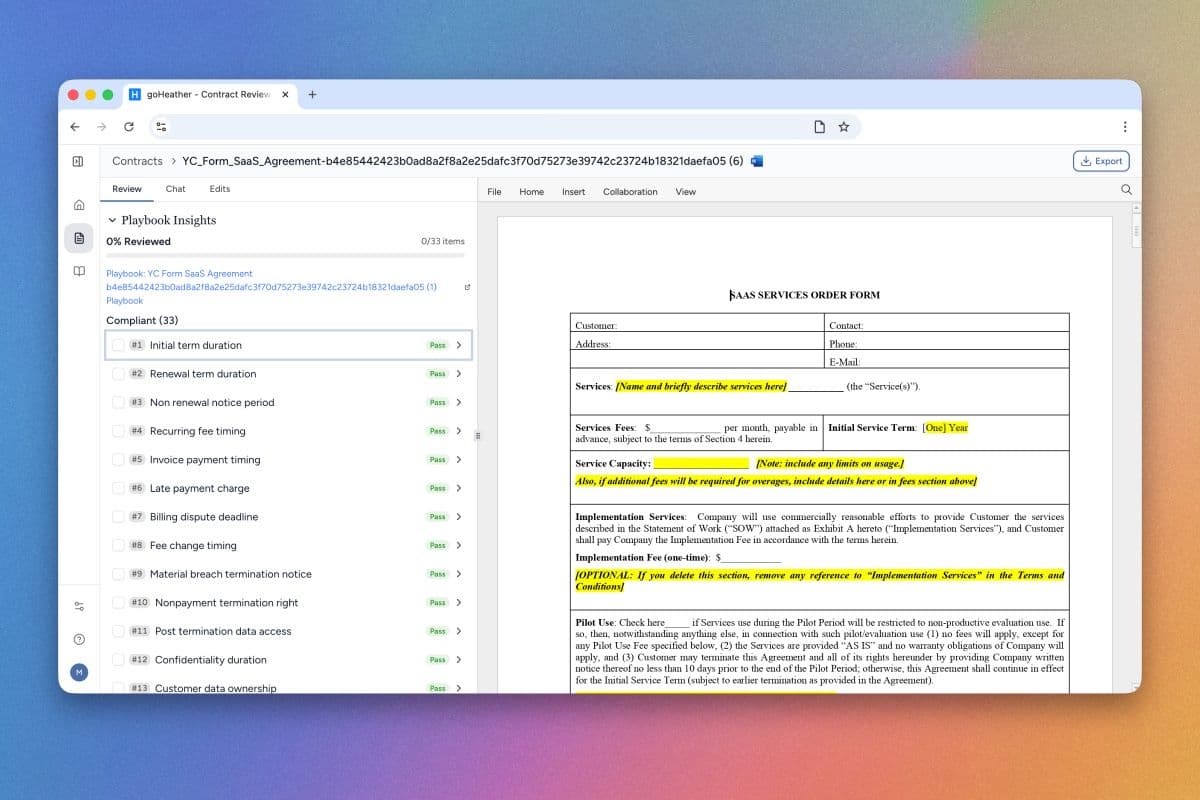
The second-biggest change is what happens after the AI finishes reviewing your contract. In V1, the review handed you back a long sidebar of findings and left you to figure out where to start. In V2, the sidebar is a guided checklist.
You go through it one insight at a time. Each card shows you the clause the AI flagged, why it was flagged, and a redline preview of the suggested replacement: red strikethrough on the original text, green underline on the new text, so you can see the diff at a glance instead of mentally reconciling two paragraphs. Two actions at the top of every card: Accept or Dismiss. Click Accept and the surgical edit lands in exactly the right spot in the document (paragraph, table cell, or across a multi-paragraph clause), with the rest of the contract untouched. There's no scrolling around hunting for the clause; a "Go to text" link jumps the editor right to it.
The whole experience is numbered and tracked. The Playbook Insights header shows progress like "23% Reviewed · 3/13 items" with a green progress bar that fills as you work, grouped into Non-Compliant and Compliant sections. Insights you've handled drop into an "Applied" section pinned to the bottom of the sidebar, and a separate Editstab at the top of the panel keeps a running ledger of every change applied to the document, tagged by source (playbook rule or standard review). There's also a parallel Standard Review Insights section underneath the playbook results that surfaces AI-generated findings outside your playbook rules, organized by risk level. You can switch between By Clause, By Risk Level, and Flat List views depending on how you prefer to work the list. When you finish the list, you get a small moment of recognition that it's done.
That last part sounds like a gimmick. It isn't. Customers in beta have told us this single design change is what makes V2 feel fundamentally different from V1. Reviewing nineteen issues in a contract used to feel like nineteen unrelated tasks stacked in a sidebar. Now it feels like a checklist you're clearing, one at a time, with the product holding your hand through every step. You always know where you are and what's left to do. That's the gamification piece, and it's where the time savings really come from. It's hard to feel stuck when the next action is always one button away.
The single most common piece of V1 feedback was: "your AI is great, but it gives me too many findings to act on." Some of those findings were minor stylistic issues. Others were existential to the deal. V1 treated them the same and dumped the whole list on you.
V2 fixes this at the source. Before a review runs, V2 asks you three quick questions on a pre-review intake form. The first asks which party's perspective should we review the contract from? (e.g. Customer vs. the other side, so the AI knows whose interests it's protecting). The second is an Additional information free-text field where you can drop in context like "this is a renewal, focus on auto-escalation clauses." The third, doing the heavy lifting, is the Review depth slider.
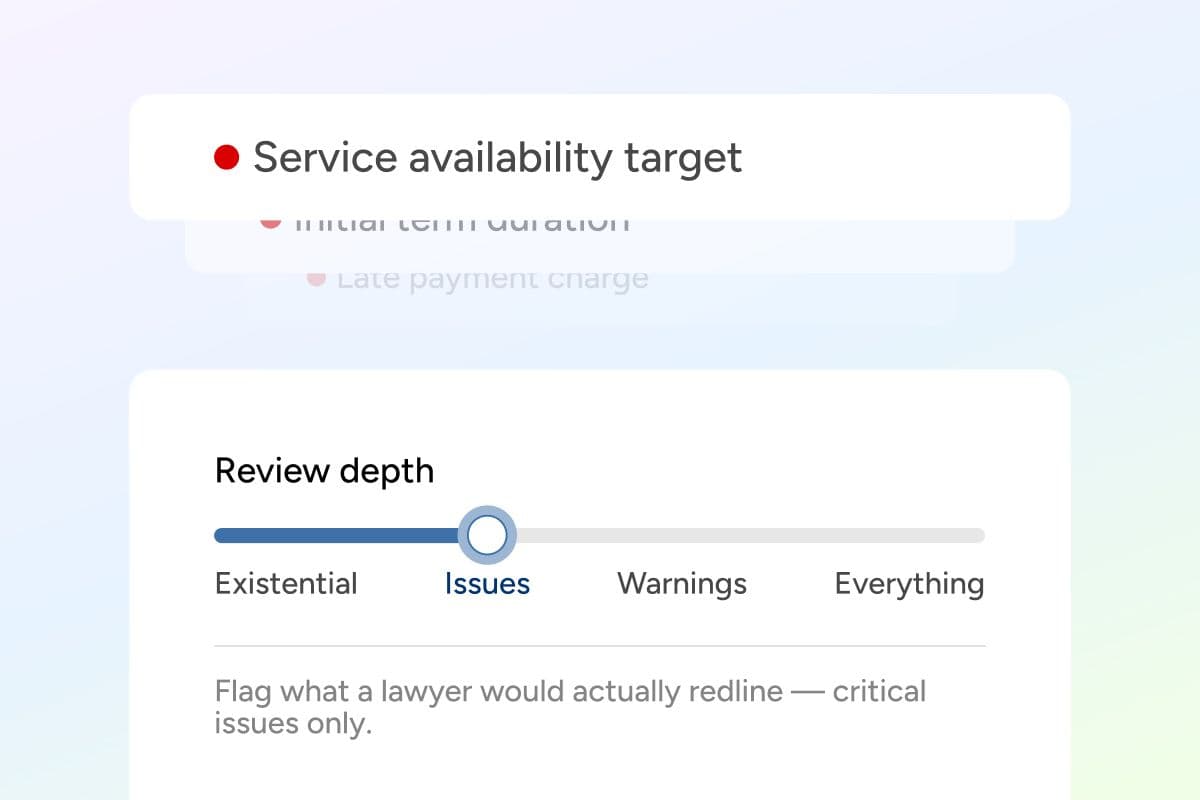
Four stops, each with its own caption so you know what you're asking for.
Existential: Only flag deal-breaking risks that could make this contract dangerous to sign. For when you're triaging an inbound NDA in two minutes between meetings.
Issues: Flag potentially critical issues that could be worth redlining only— critical issues only. The default. Calibrated against the contracts we've seen across beta users to match what many users would actualy mark up.
Warnings: the next tier of meaningful concerns beyond what's strictly redline-worthy, useful when you have a little more time or the deal is bigger.
Everything: Comprehensive clause-by-clause review of the entire contract. The full V1 experience, for when you want every finding the AI can produce.
Because depth is set before the review runs, this isn't just a sidebar filter. It actually changes what the AI looks for. For a fast review on a stack of NDAs, set it to Existential or Issues and you'll get three or four findings per contract to clear. For a deep dive on a master services agreement, push it to Everything and work the full list. Same review engine, four modes, calibrated to how much time the deal actually warrants.
This is the feature most directly responsible for the time savings. Most of the hours V1 customers spent in the product weren't spent fixing real issues. They were spent triaging which findings actually mattered. V2 does that triage for you, in the right place, before the work starts.
Chat (what we used to call the AI Assistant in V1) got a real upgrade. You can already use it to ask clause-level questions, get risk assessments, sketch out a negotiation position, or just talk through what a section actually does in plain English. New in V2: you can take action from inside the conversation.
Ask Chat "optimize this clause for the provider by limiting liability and restricting scope" and it doesn't just hand you a paragraph to copy and paste back into the document. It proposes a Suggested Edit, shows you exactly what would change, and gives you a one-click Accept button right inside the chat. Click it, the change lands in the document at the right location, and you keep talking. Ask a follow-up, ask for a more aggressive version, ask for the indemnification cap to be tightened, and accept each one as it lands.
If you select text in the contract before opening Chat, the selected passage automatically becomes the conversational context. A "Selected text" chip shows above the input so you know exactly what you're talking to the AI about. Drop the chip and you're back to talking about the whole document.
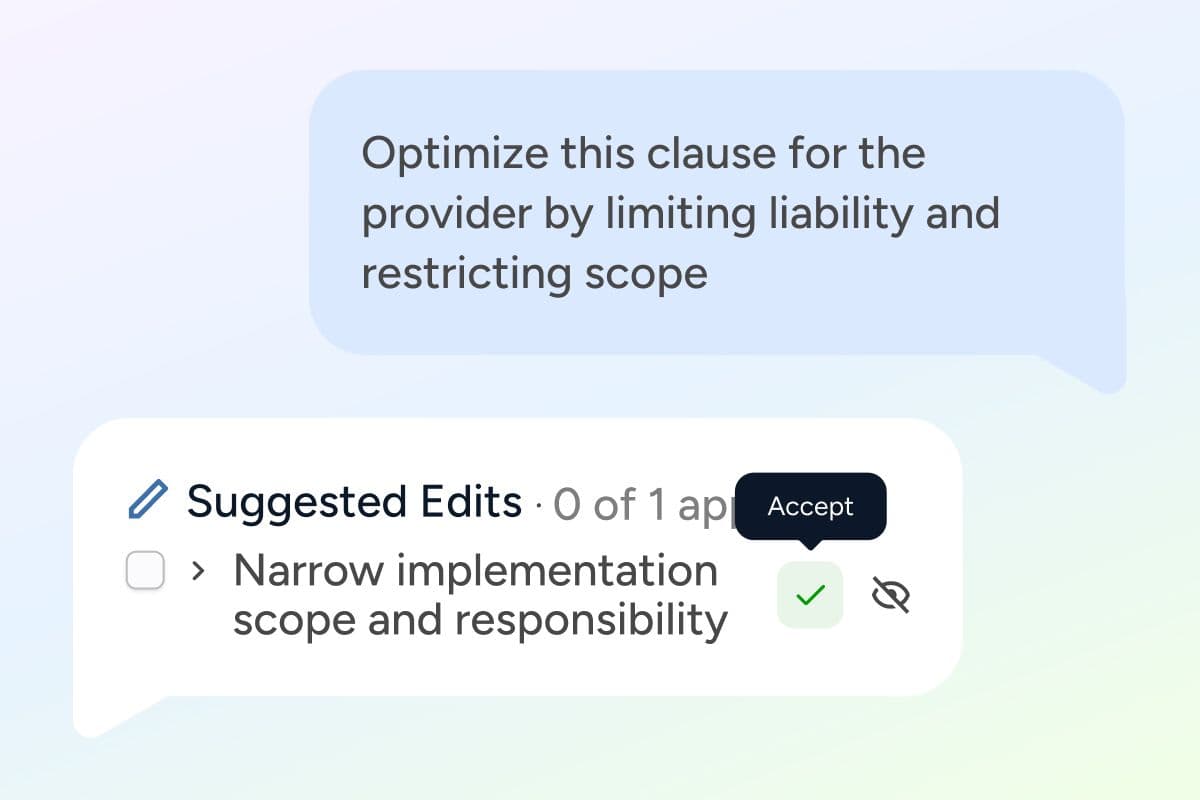
The combination of Chat plus surgical edits is the most powerful pattern we've built into V2. You can drive an entire negotiation pass from the chat sidebar, talking through the contract the way you'd talk to a junior associate, and the document changes in real time on the screen next to you. It's the closest thing we have to "review as a conversation," and it's the feature beta users keep coming back to. Several have told us it's the moment V2 stopped feeling like a tool and started feeling like a collaborator.
Pull the four threads together and here's what V2 actually does. It takes contract review from "scroll, read, find, edit, repeat," a process that takes hours per contract, to a guided workflow that holds your hand through every issue, surfaces only what matters, and applies the change at the click of a button. The editor is fast and stable because we own it end to end. The review is gamified in the good sense: you can see where you are and what's left, and the act of clearing the list feels like progress instead of work. The Review depth slider takes the triage step off your plate before the AI even starts. And the AI doesn't just describe problems anymore. It fixes them, in place, exactly where you want, either from the insight card or from Chat.
The customers we ran V2 past in beta have been telling us that what used to take them an afternoon now takes a coffee. We expect that gap to widen as the model gets sharper, but the workflow is doing as much of the work as the AI is. The product is engineered to take you from "I have a contract to review" to "I'm done" with as few steps and as little cognitive load as possible.
That's the headline. Everything else in V2 (and there is a lot of else, from read-only PDF reviews to a starter playbook library to a rebuilt billing system to a new Home page) is in service of that one thesis.
Nothing. Log in tomorrow after 11 AM ET and V2 will be there. Your reviews, playbooks, and account history come with you automatically. If you've been using the Word add-in, you can keep it open for any in-flight work on V1, but I'd encourage you to try a fresh review in V2. Most of you will not want to go back.
If you're not a customer yet, start a free V2 trial. It takes about 90 seconds to sign up, there's no credit card required, and you can pull a starter playbook off the shelf and run a real review before the kettle boils.
If you've used V1, you helped build V2. Every bug report on the Word add-in, every "this sidebar is overwhelming" comment, every "the AI is great but I can't tell which findings matter," we read all of it. The four features in this post are not features we came up with in a room. They are answers to questions you asked us, sometimes politely and sometimes not. The add-in's quirks, the wall-of-red sidebar, the noise-to-signal problem: those weren't problems we noticed on our own. You named them. We built the fix.
Jeff Dutton is a lawyer who advises on technology, corporate, privacy, commercial, employment and real estate law.
Jeff founded his own small law firm, Dutton Law, in 2016 (and merged it with a larger firm in 2019). Before that, Jeff was a prosecutor and a commercial law lawyer at a national boutique law firm.
Jeffrey is a frequent lecturer on legal matters and has been published in newspapers and trade journals. In addition, Jeff was the editor and co-author of a leading employment law text for lawyers for many years.
Education:
Western University, BA (2009)
University of Ottawa, Faculty of Law, JD (2012)
Get the latest contract tips, updates, and exclusive content straight to your inbox. Subscribe now and never miss out on what's new in contract law or at goHeather!
Our AI sifts through each clause, identifying potential risks. This enables us to provide quick yet comprehensive contract reviews, equipping you with the legal information you need to make informed decisions.
USA
1 Sansome St., Suite 1400
San Francisco, CA 94104
United States
International
10 Dundas St. East, Suite 1002
Toronto, ON M5B 2G9
Canada